Choosing Remote Patient Monitoring Software for Modern Practice
Remote patient monitoring software has kind of, well, become more necessary than ever in today’s care world. Actually, with more practices doing value-based care, having patient data in between visits helps a lot.
A remote patient monitoring platform isn’t only about flashy features, it’s mostly about how it fits inside your daily operations. Some tools sound great on demos but mess with your workflows. Others won’t connect with your EMR or lack even basic compliance features.
So, maybe you already started using one, or you’re still looking. Either way, knowing what works and what doesn’t, it really matters. This post walks through what to think about. So you can pick RPM software that actually, kind of, helps you, not just adds noise.
The Role of Remote Patient Monitoring in Clinical Workflows
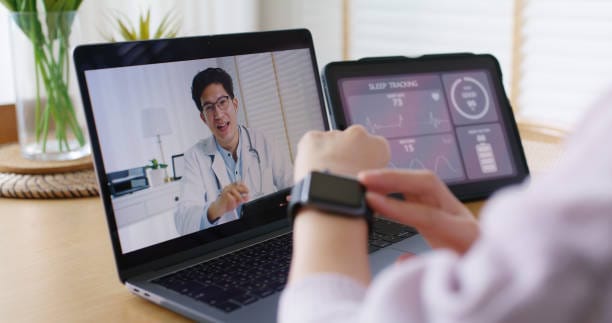
Remote patient monitoring (RPM) is now, like, a major part of ongoing treatment in many care teams. Stuff that used to need in-person follow-ups, now kind of happens remotely with little interruption.
Clinicians get data straight from patients without needing to wait for symptoms to worsen. This fits perfectly with how care models are evolving. Less about sick visits, more about staying ahead.
Also, RPM works well for conditions needing frequent checks. Patients with COPD or diabetes aren’t always able to come in just to report daily vitals. RPM lets you see trends without needing every detail repeated.
Why Remote Monitoring Is Expanding Across Specialties
To be honest, RPM has grown outside just primary care. You’ll see it in cardiology, nephrology, pulmonary, even psychiatry. That’s not by accident.
Specialists need data to see what’s changing, RPM helps with that. It’s not only about capturing vitals but seeing trends in between visits. And since value-based models pay for outcomes, not just visits, this is really helpful.
Also, remote tools are good for hard-to-reach patients. In rural areas, or folks that manage complex commodities, RPM lets them still get good care. So yeah, the expansion makes sense.
Common Use Cases in Chronic Care Management
RPM is kind of a natural fit to chronic care. Conditions like heart failure, diabetes, hypertension, they need close watching, but not always in person.
Let’s say someone’s weight jumps overnight. That could mean fluid retention. Instead of waiting for an ER trip, you’d already see the weight alert from the RPM software.
This kind of catch-it-before-it-breaks care isn’t flashy, but it’s effective. The monitoring platform keeps the data flowing. You just act on what matters.
Key Features to Look for in Remote Patient Monitoring Software
So, let’s talk about features. Not the fancy kind, but what actually makes your work easier. Because honestly, a lot of remote patient monitoring software platforms try to do too much.
You want: simple setup, real-time alerts that aren’t annoying, smooth data flow into your charting system, and something that won’t break when you grow from 10 to 100 patients.
More isn’t always better. Sometimes, just the right alerts and clean interface saves you more time than anything else.
Device Compatibility, Alerts, and EMR Integration
If the platform only works with, like, three devices, that’s gonna cause problems. Most patients already have stuff they use. You can’t make everyone switch for the software.
Alerts need balance. Too many, and you’ll ignore them. Too few, and you’ll miss something. The good ones let you customize thresholds that make sense in your clinic.
And integrations? Big deal. Double entry should be illegal, honestly. Your team should see everything inside the EMR, not jumping between tabs just to find blood sugar readings.
Data Security, Reporting, and Scalability for Practices
Security shouldn’t be optional. The RPM tool must have end-to-end encryption and meet HIPAA, but like, really meet it, not just say it does.
Reporting also matters. You need charts and summaries that help you see what’s changing. Not just a flood of unreadable numbers.
And growth, maybe you start small, but your needs increase. The system should handle more patients, users, and even multiple sites without breaking down or needing retraining every time.
Understanding Remote Patient Monitoring Billing and Codes
This part gets tricky. Remote patient monitoring codes sound simple, but are kind of easy to mess up. You’ll want to track time right, log interactions, and know what each CPT code means.
Otherwise, you end up doing the work but not billing for it right. Or worse, billing wrong and getting flagged.
Overview of CPT Codes for RPM Reimbursement (99453, 99454, 99457, 99458)
These are the four main RPM billing codes:
- 99453 – One-time code for training and setup.
- 99454 – Recurring monthly for data capture and device time.
- 99457 – First 20 mins reviewing data and communicating.
- 99458 – For extra 20-minute chunks after that.
We’ve saw that most denials happen when time logs don’t match up, or if consent was never documented. So yeah, it’s not just “submit and go.”
Optimizing RPM Documentation for Audit and Claims
Documentation isn’t just a check-box. It’s how you prove you did the work.
Make sure your notes include:
- When device was setup
- What type of data is being tracked
- Review dates and actions taken
- Who did the interaction (RN, MA, physician)
Some platforms pre-fill this stuff. Others leave you to do it all by hand, which, obviously, takes more time and opens room for error.
Benefits of Remote Patient Monitoring for Providers
RPM with the help of Remote patient monitoring software helps providers more than you maybe first think. It’s not only about checking vitals, it’s more about keeping patients connected to care.
You’ll make better decisions, earlier interventions, and avoid missed red flags. That matters in both clinical and revenue sides of the work.
Improved Clinical Decision-Making and Care Continuity
RPM helps you see what’s happening over time, not just what a patient remembers in visits.
Say someone’s BP was creeping up for two weeks, but they never mentioned it. You’d see that in the trend graph, not after the ER visit.
Also, when multiple people (like PCP and cardiologist) monitor the same patient, they stay in sync. RPM data acts like glue for care continuity.
Enhanced Patient Engagement and Risk Management
Engagement isn’t just about patient portals. When someone sees their daily readings, they kind of get more involved in the process.
Also, patients who are monitored tend to follow plans better. They skip less meds. They understand what’s working.
From the risk side, you catch more things early. Hospitalizations go down. Emergency calls go down. All that matters in value-based payment models.
How SmartCare360 Supports as Remote Patient Monitoring Software
SmartCare360 provides a platform that’s pretty adaptable across specialties. It doesn’t force your workflow, it kind of fits into it.
Tools to Manage RPM Billing, Codes, and Compliance
You get tools that help track billing minutes, log device use, and confirm time for 99457/99458.
If you’ve had problems with audit trails or missing billing notes, this type of system helps reduce human errors. It’s not perfect, but better than spreadsheets.
It also flags missed billing opportunities so teams don’t forget to log valid interactions.
Platform Features Built for Multi-Specialty Use
Some RPM systems are too narrow. They’re made for just one type of practice. But SmartCare360 kind of lets each provider or department adjust their own rules.
For example, cardiology might set different alerts than behavioral health. You don’t need two platforms to handle that.
That flexibility keeps everything more tidy, especially in integrated or group practice settings.
FAQs
What is remote patient monitoring?
It’s when providers track patient health data, like vitals, outside the office, using devices and software. It helps with earlier interventions and reduces unplanned care.
What are examples of RPM devices?
Common devices include blood pressure cuffs, glucose monitors, pulse oximeters, smart scales, and sometimes wearables or inhalers.
How do you bill through remote patient monitoring software?
You use CPT codes (99453, 99454, 99457, 99458). Each code covers different actions, setup, device time, review time, and patient communication.
Why do doctors use RPM?
RPM gives doctors more visibility between visits. It improves decisions, reduces ER visits, and aligns with quality-based care goals.
Is RPM data safe and secure?
Yes, when the platform follows HIPAA and uses data encryption. Still, you should check every vendor’s privacy setup before going live.